A to-do list can tell you what needs doing. It does not always tell you where those tasks fit.
That is the problem behind the new Recordo calendar release.
For many people with ADHD, planning fails not because the list is empty, but because the list is floating in a separate universe. You have tasks in one place, meetings in another, appointments somewhere else, and a few things you promised yourself you would somehow squeeze in later.
Then the day starts, real life appears, and the plan collapses.
Recordo now helps you plan with more context: your tasks, your time, and your existing calendar commitments in one calmer view.
See tasks in time
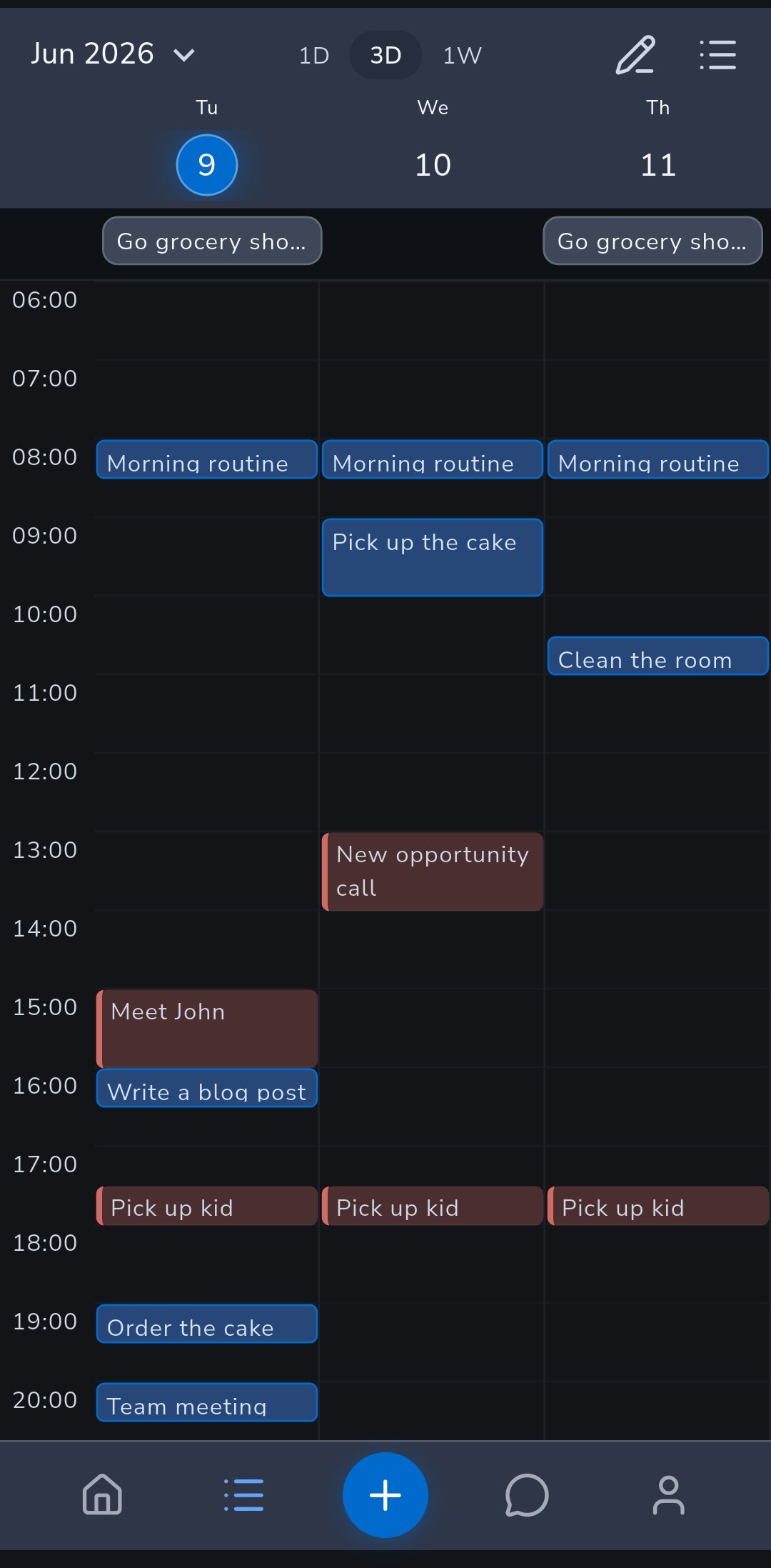
Recordo now has a calendar planning view for ADHD tasks.
You can switch between 1 day, 3 days, and 1 week, depending on how much of the future you want to see. Some days, one day is enough. Other times, seeing the next few days helps you avoid pretending that everything can happen today.
Timed tasks appear on the calendar as blocks. If a task has a duration, Recordo can show how much space it actually takes. That small detail matters. "Write report" feels very different when it is a vague task on a list compared with a 90-minute block sitting between two meetings.
Tasks without a time do not disappear. They stay visible, so you can still decide what needs scheduling, what can stay flexible, and what should move.
Bring in your real calendar
You can now connect Google Calendar to Recordo.
This lets Recordo show your existing events as read-only planning context. Meetings, appointments, school runs, calls, and other blocked time can appear alongside your Recordo tasks, so you are not planning into an imaginary empty day.
Recordo does not edit your Google Calendar. It reads selected calendars so you can see what time is already taken while planning your tasks.
That boundary is intentional. Google Calendar stays your calendar. Recordo stays your ADHD task and planning space.
Show Recordo tasks in other calendar apps
There is also a new external calendar subscription option.
Recordo can create a private calendar link that you can add to Apple Calendar, Google Calendar, Outlook, and other calendar apps that support calendar subscriptions.
This is useful when you want your Recordo tasks to appear wherever you already check your day. The subscription is read-only, so changes still happen in Recordo. External calendar apps simply display the tasks.
Calendar apps refresh subscriptions on their own schedule, so updates may not appear instantly everywhere. But for many people, just seeing Recordo tasks next to the rest of the day is enough to make the plan feel more real.
Why this matters for ADHD
ADHD planning is often a visibility problem.
It is easy to make a list that looks reasonable. It is much harder to notice that the list requires six focused hours, the day only has two open ones, and one of those hours is right after a draining meeting.
- What already has a time
- What still needs a time
- What has a real duration
- What might not fit today
- Where there is actually room to start
The goal is not to turn Recordo into a full calendar app. The goal is to make the task plan easier to trust.
A calmer way to choose what comes next
Lists are still useful. Recordo still has them.
But some decisions are easier when you can see time. If a task needs focus, you can look for a real opening. If your day is packed, you can stop blaming yourself for not doing five extra things. If something has no time yet, you can choose whether to schedule it or leave it flexible.
That is the real point of this release: less guessing, fewer invisible conflicts, and a better chance of choosing a next step that fits the day you actually have.
Discussion
Loading the conversation…
Open the discussion in the Recordo community