See the steps instead of one big blur
Tap Break this down and the Coach saves a checklist to your plan, or write the steps yourself. Tick them off as you go and edit them when the task changes.
A timer can’t help if you can’t find a way in. Momentum Mode breaks a stuck task into small steps, gives you one concrete action to start with, and keeps the checklist, the Coach, and the clock in the same task.
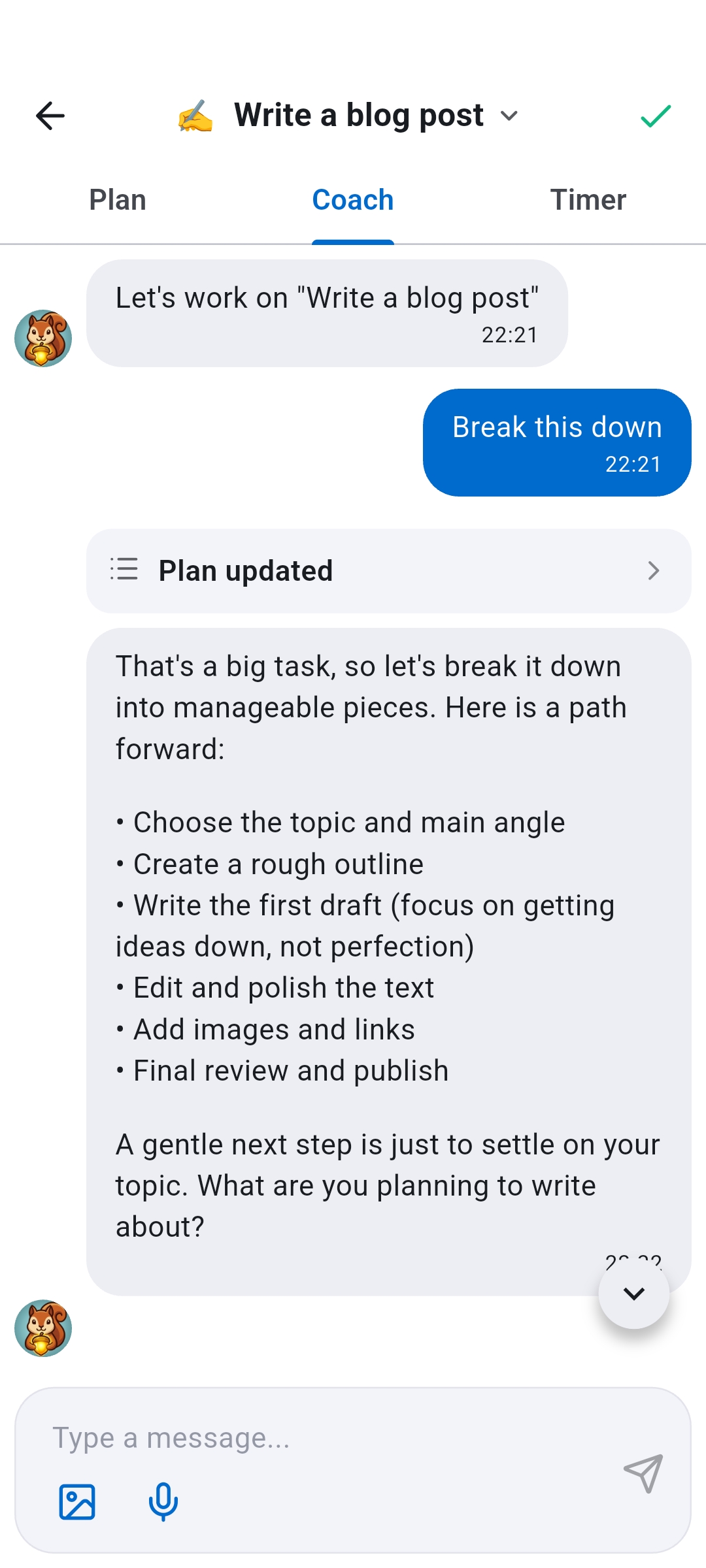
Open Momentum Mode from any task. Plan, Coach, and Timer sit side by side, so you are not juggling a timer app, a notes app, and a to-do list while trying to focus.
Tap Break this down and the Coach saves a checklist to your plan, or write the steps yourself. Tick them off as you go and edit them when the task changes.
When starting is the hard part, Help me start gives you the smallest concrete move. If you drift or hit a wall, I got stuck helps you back in.
Count down from 25 minutes, pick anything from 5 to 60, or count up. The timer keeps running while you switch tabs, and your screen stays on while it runs.
Say “Write a blog post” has sat on your list for a week. You open it in Momentum Mode and tap Break this down. The Coach saves six steps to your plan, from choosing a topic to publishing, and suggests the gentlest start: settle on a topic. You set a 25 minute timer, tick off the first step, and leave with Save progress and quit. Next time you open the task, the plan is waiting with that step already checked.
Pomodoro timers assume you already know what to do and only need to keep going. With ADHD, the stall often happens earlier.
Staring at a vague task burns the energy you meant to spend on it. A concrete first step next to the clock gives the timer something to measure.
One line on a list can hold a dozen decisions. A visible checklist lets you finish a piece and see it done, instead of holding the whole thing in your head.
Checklist changes save as you make them, and Save progress and quit keeps your session progress with the task. Coming back does not mean starting over.
It shrinks the start. The Coach breaks the task into a checklist and suggests one concrete first action, and the timer gives that action a clear window. You tick off steps as you go instead of holding the whole task in your head.
The timer works like one: count down (25 minutes by default, with presets from 5 to 60) or count up. The difference is where it lives: inside the task, next to its plan and a Coach that knows what you are working on.
The Coach uses the coach personality you chose and any personal context you have added in Recordo. It stays focused on the task you opened, including its notes and current plan.
Yes. Checklist changes save as you make them. Leave with Save progress and quit to keep your session progress too. If you quit without saving, your plan stays, but that session’s timer progress is not kept.
Yes. A recurring task keeps its plan for every occurrence, and check marks apply only to the day you are working on, so the next one starts with a fresh checklist.
Yes. Plan and Timer are free to use. Coach replies count toward your daily chat allowance, and if you reach it, Plan and Timer keep working.
Add it to Recordo, open Momentum Mode, and make the first step small enough to start today.