Start without deciding
Recordo ranks open tasks by how overdue or close to due they are and by priority, with a little variety so the same stuck task does not sit on top forever.
When everything looks equally urgent, choosing can take longer than doing. Recordo looks at what is overdue, due today, and marked important, then puts one task on top. Do it or push it back, and the next one is already waiting.
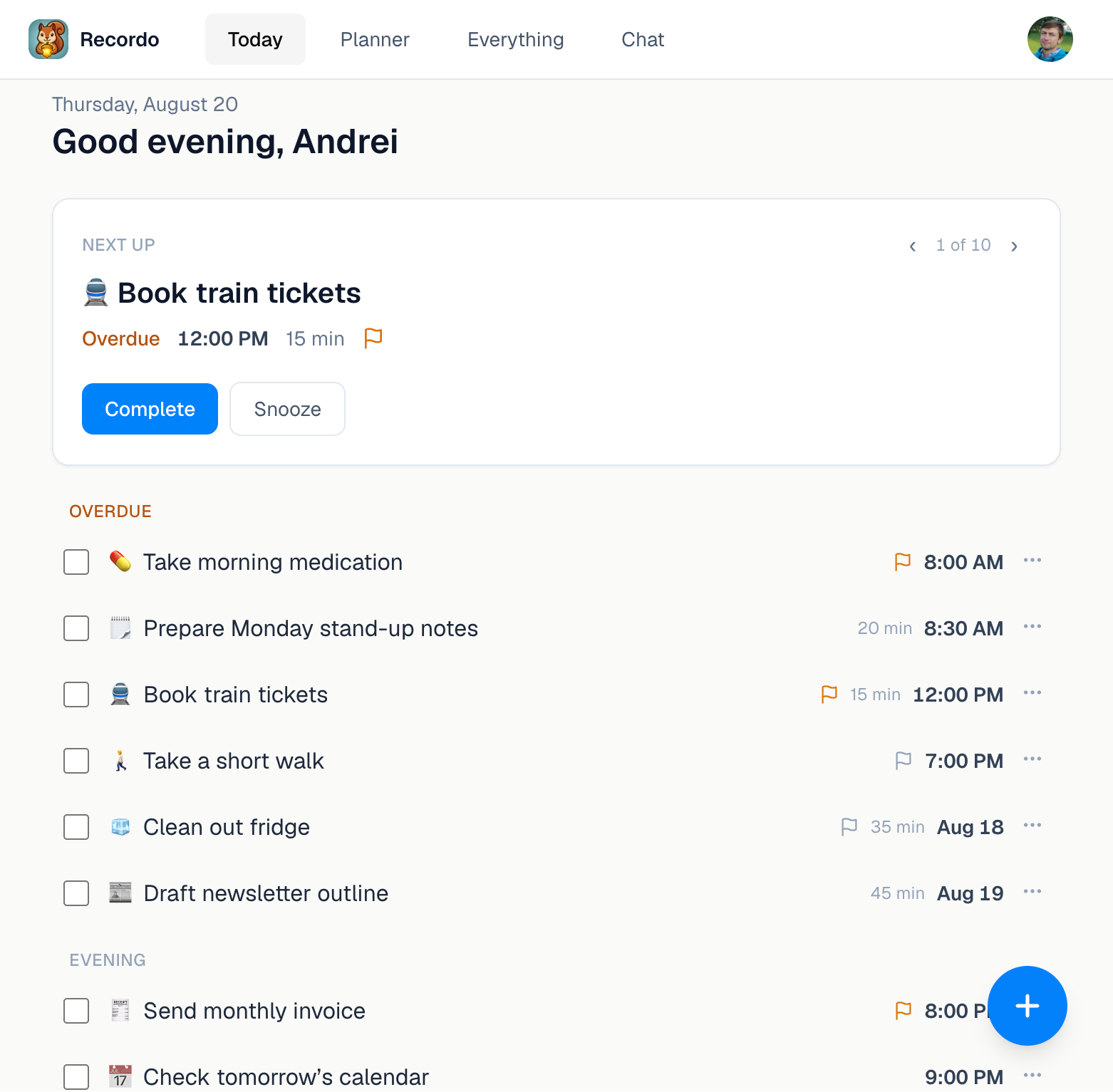
Recordo does the sorting, so your energy goes into the task itself. The rest of the day stays one scroll away.
Recordo ranks open tasks by how overdue or close to due they are and by priority, with a little variety so the same stuck task does not sit on top forever.
Not now? Put the task off for 15 minutes, an hour, or until tomorrow. It steps aside, stays in your list, and the next task takes its place.
The calendar view lays timed tasks on a grid: one day, three days, or a week in the app, and a day, week, or month on the web. Drag a task without a date into a free slot to give it a time.
A long list asks for a decision before you can do anything, and with ADHD that is often where the day stalls. Recordo makes the first pick for you, keeps overdue work in its own group instead of letting it quietly vanish, and lets you skip or postpone without deleting anything.
Say it is 10:40 and you meant to start at 9. Recordo suggests “Book train tickets”, overdue, 15 minutes. You are not up for it yet, so you push it back an hour. “Reply to the landlord” moves up, you finish it in five minutes, and the day has started. The train tickets come back before noon.
The same tasks show up in Today, in the calendar, and in your reminders, on your phone and on the web.
Recurring tasks appear on every scheduled day. Checking off today’s medication does not end the routine, and you can cancel a single day without touching the rest.
Tasks with a duration that run into each other get a small warning. With Pro, connect Google Calendar to see your events next to your tasks, read only.
In the phone app, Coach me on the next-task card opens Momentum Mode: a checklist plan, a coach for the first step, and a timer.
It looks at open tasks that are overdue, due today, or due in the next few hours, including today’s routines, and weighs urgency and priority. Tasks with no date stay out of it until you give them one.
Then don’t. In the phone app, Skip shows the next task and Remind later hides this one for 15 minutes, an hour, or until tomorrow. On the web, the arrows on the card browse other suggestions, and Snooze offers the same three options.
Yes. The app’s calendar view shows one day, three days, or a week, and the web Planner shows a day, a week, or a month, each with a tray for tasks that do not have a date yet.
With Pro, yes. Connect Google Calendar in the app and your events appear as read-only blocks next to your tasks, so you can see where a task really fits. Recordo never edits your Google Calendar.
Yes. Today, the calendar views, recurring tasks, and reminders are free. Pro adds calendar integration and more AI chat each day.
Yes. Recordo runs on iPhone, Android, and in the browser at console.recordo.app, with the same account and the same tasks. Task reminders arrive through the phone app.
Put everything into Recordo, then open it to one clear next step instead of the whole pile.