It's an option, not a replacement. Classic Home still shows one next task at a time, and it stays the default.
When the list stops getting through
Open the same list every day for a few weeks and it starts to blur. Your eyes slide over the rows. Ten tiny errands look the same as one hard thing, and nothing stands out enough to start.
A long list can also feel loud. Every row reads like a demand, and the more of them there are, the more it looks like you're behind before the day has started. Then you finish something and it vanishes, so by the evening the screen says very little about what you actually did.
Zen Valley is a different way in. Same tasks, same reminders, but you see them in soft colors, along a river, in light that changes through the day. It's designed to feel calm to open, and it's different enough from a list that your day gets a second look.
What you see
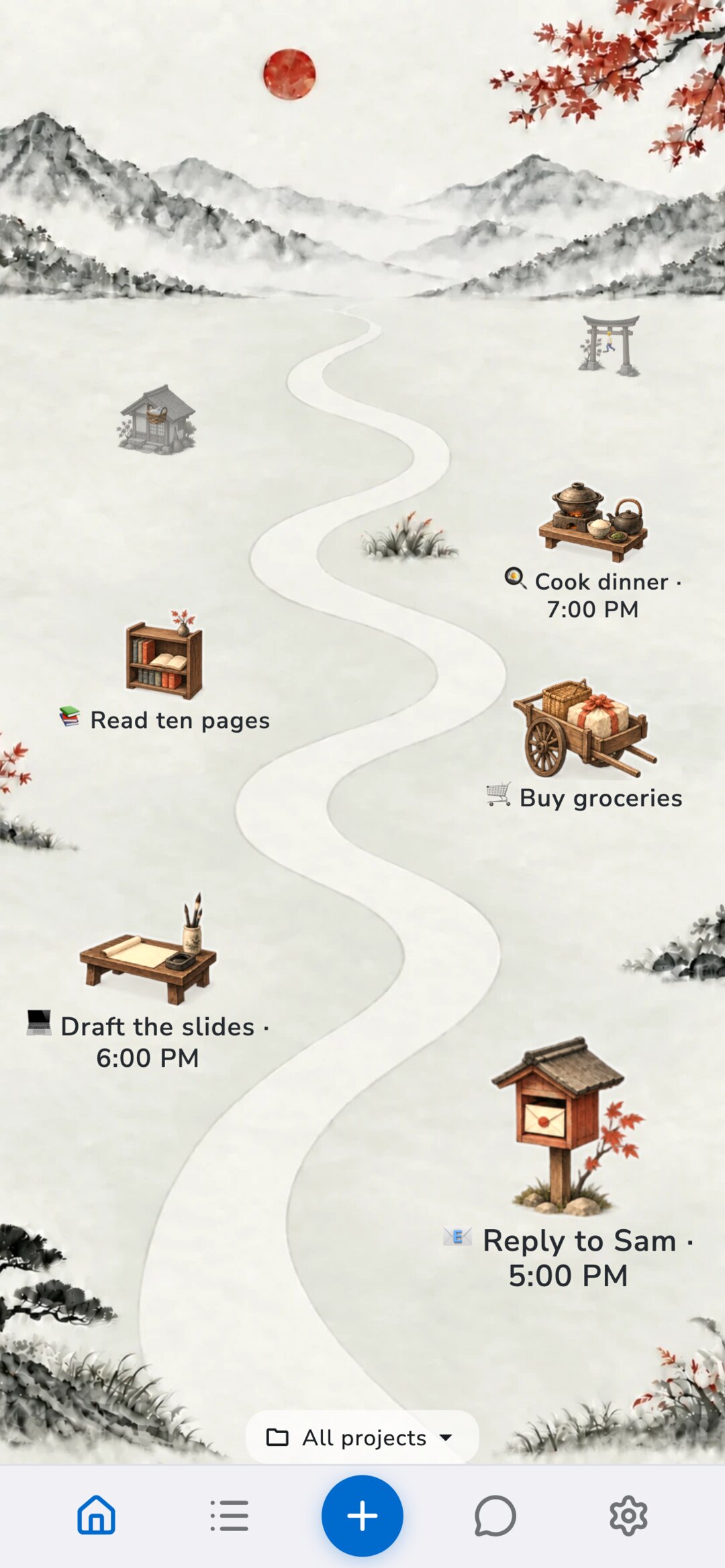
Each task gets a landmark along the path through the valley: a letter box, a writing desk, a cooking station, a book cabinet, a stone lantern. The landmark follows the task's emoji, so a task to reply to someone and a task to cook dinner look like different places. The label under it shows the task's name and time.
Up to seven tasks fit in the scene, the near ones big and the far ones small. The rest wait behind +N more at the bottom, which opens them as a list.
The valley keeps time with you. Open it in the morning and the sun is coming up over the mountains. Check it late at night and the river is moonlit. In between there's a bright daytime valley and a sunset, so the screen always matches the hour you're actually in.

Finishing something
Tap a landmark to open its menu: complete the task, get reminded later, or open its details. When you complete it, a little confetti plays and the landmark stays exactly where it was, quieter and without its label.
By the end of the day the valley shows what you did, not just what's left. Nothing in it depends on you, though. There are no streaks, no score and nothing that wilts if you skip a day. Tomorrow starts with a fresh valley.
If you use projects, the All projects button at the bottom narrows the valley to one project, the same way project focus works on Classic Home.
A calmer Home, a few taps away
Open Profile, then under Appearance tap Home theme and choose Zen Valley. It's free, and your tasks, reminders and lists don't change, only how Home shows them. To go back, choose Classic in the same place.
Help me pick the next one
Zen Valley is the first theme. I'd like to make another, and I would rather make the one you'd actually open every morning than guess.
So tell me: where would you like to see your day? A harbor, a space station, a forest cabin, a city at night, a garden, something I haven't thought of. Tell me what tasks would look like there and what should happen when you finish one.
Write to me at andrei@recordo.app. I read every message.
Discussion
Loading the conversation…
Open the discussion in the Recordo community