Coming soon with Muse

Save tasks from Muse before they slip away

A task that only lives in a chat thread is a task you'll forget. When the Recordo connector for Muse launches, you'll be able to turn a passing thought into a saved task or note, ask what needs you next, and check things off, all from the conversation. Everything will land in Recordo, with the due time and reminder you set.

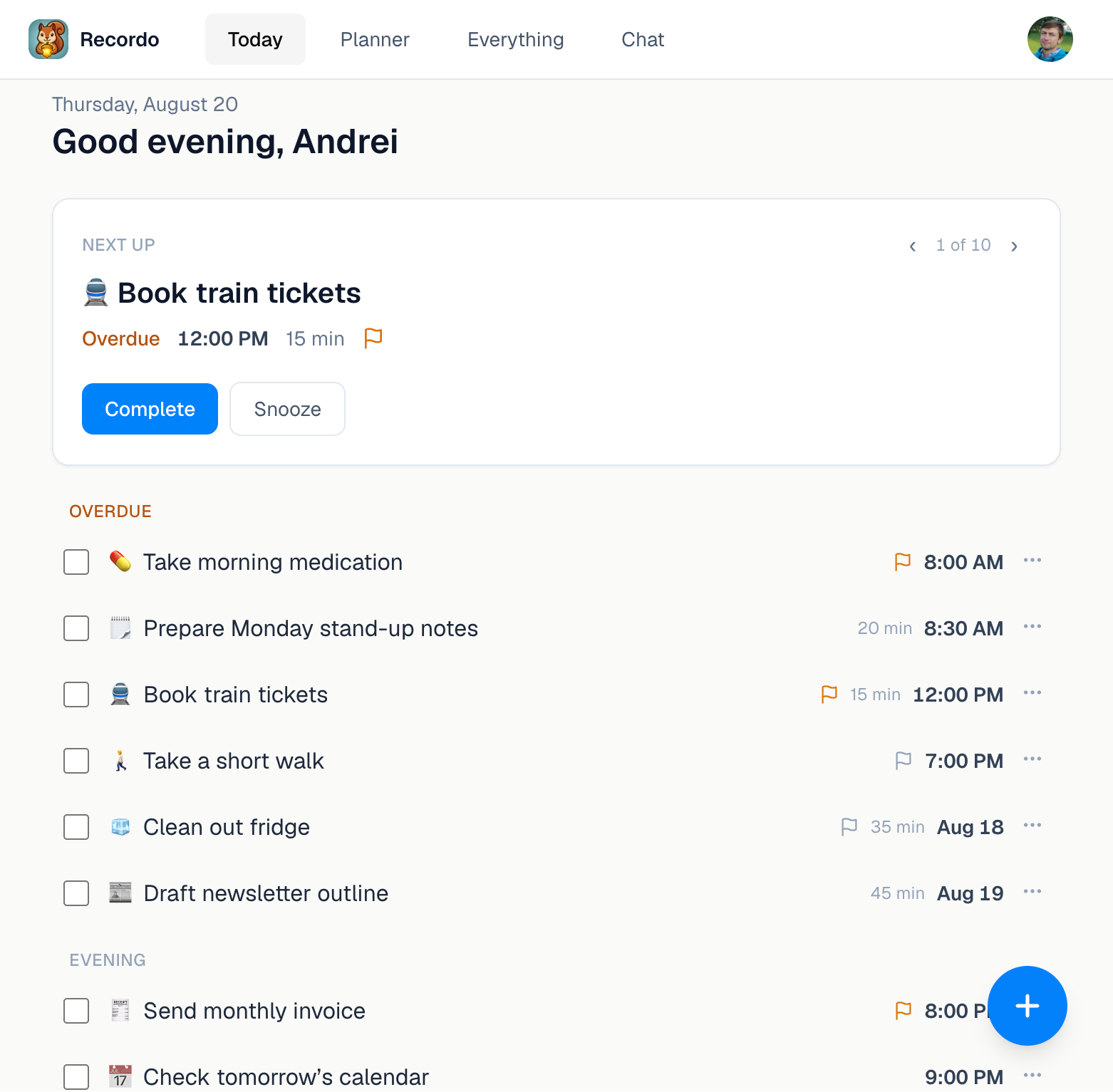
Recordo Today screen showing a Next Up task with Complete and Snooze actions and the daily task list.
Tasks you save from Muse will show up in the Recordo Today view

From passing thought to done, without leaving the chat

When the connector launches, these Recordo actions will work inside your Muse conversation.

01

Catch the thought while it's still there

Say “call the dentist tomorrow at 10” and Recordo will save a task with that date and time. A repeat schedule or reminder can come along in the same sentence. Ideas and things to remember will be saved as notes.

02

Get one next step, not the whole wall

Ask what to do next and get a single task, picked by urgency and priority. Ask what today looks like and see your timed tasks in order, including the ones you missed.

03

Close the loop from the chat

Mark a task done, move it to another day, or fix its details. Completing a repeating task finishes only that day, and the routine comes back on schedule.

What one messy message could become

You type: “I need to renew my passport, and remind me to take out the trash every Tuesday at 8 pm.” Recordo can save that as two tasks: the passport, which you can schedule whenever you're ready, and a Tuesday evening routine with its own reminder. Next week the trash task will still be there, even if you never open that chat again.

Why your list needs a real app behind the chat

Chat is a great place to think out loud, but a conversation scrolls away. Recordo gives every task you save a home that keeps working after the conversation ends.

  1. 01

    Waiting for you in Today

    Saved tasks will appear in the Recordo Today view on your phone and on the web, with one next task at the top and overdue work in plain sight.

  2. 02

    Reminders that reach you

    Give a task a due time and Recordo can remind you at that time or minutes or hours before, even when the chat is closed. Notifications need your permission.

  3. 03

    Routines that keep coming back

    Repeating tasks return on their own schedule. Checking off today's occurrence doesn't delete next week's.

Recordo and Muse questions

What will I be able to do with Recordo in Muse?

Save tasks and notes, ask what's on today or what to do next, change a task's details or schedule, and mark tasks complete. Every change will show up in your Recordo account.

Will tasks I save in Muse show up in the Recordo app?

Yes. After launch, tasks you add, change, or complete through Muse will update your connected Recordo account, so you'll see them in the app on your phone and on the web.

Will Recordo remind me about tasks I save in Muse?

Yes, when the task has a due time. Recordo will use the reminder you ask for or your default reminder setting. Reminders come from the Recordo app, so notifications need to be allowed on your device.

Can I remove something I saved by mistake?

Yes. You'll be able to ask Muse to delete a task or note, and it will be permanently removed from Recordo.

Can I connect Recordo to Muse today?

Not yet. The Recordo connector for Muse is coming soon. If you want Recordo in a chat now, it already works in ChatGPT, Claude, and other MCP clients.

Do I need a Recordo account?

Yes. Private task and note actions will require you to sign in to your Recordo account and review the access Muse asks for.

Is Recordo free?

Yes, to start. You can download Recordo for free and start capturing tasks and notes right away. Paid plans unlock additional AI and premium features.
Stop losing tasks in old chats

Muse support is coming soon. Until then, download Recordo and give your tasks, reminders, and next step one home.